Emerald Time Support
Version 1.5
FAQ
- My iPhone™ is only off by 4 seconds; why do I need this silly app?
-
You don't. But some of us think such an error is insanely huge for a 21st century computer. It's just not right.
- It doesn't properly work on the iPad
- Please upgrade to version 1.3 or later.
- The seconds have disappeared!
- Tap the seconds window. That cycles between displaying the seconds with tenths, the seconds only and nothing at all. That's convenient if you find the blinking seconds annoying. But it's confusing if you don't know that. Now you do.
- What does a "?" in the upper right mean?
- That Emerald Time can't contact any servers. Make sure you really have internet connectivity. Be patient. Or tap the lights to force another retry. Sometimes it takes several tries.
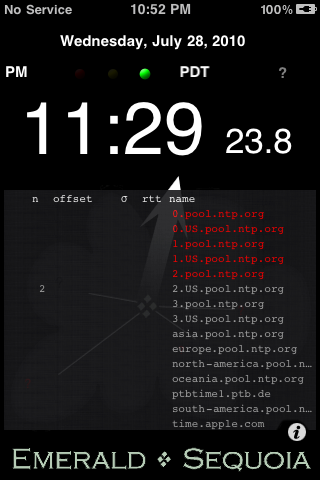
- All the servers in the list are red or gray like the picture above.
- See previous answer.
- What do the colors mean in the table of stats?
-
- Gray: no attempt has yet been made to contact this server
- Red: unable to contact the server
- Orange: making the first attempts to contact the server
- Yellow: getting data from the server but not yet enough
- Cyan: same as green but the green one had more consistent statistics
- Green: Emerald Time has suficient good data to accurately determine the server's time
- What are those funny server names?
- Emerald Time uses servers from the NTP Pool Project. The addresses you see are not real; they just redirect (more or less at random) to the real servers. You will not get the same real server each time. This is good.
- But what if I somehow get connected to a really remote server on another continent?
- It will probably work just fine. An NTP server half way around the world seems to be able to supply a more accurate time than the cell phone tower a mile away. But Emerald Time picks the best of the servers it tries anyway, so it's not likely that a really distant one will be picked.
- My iPhone has GPS built in. Doesn't that have a really accurate clock?
- It sure does, and it's accurate to a few nanoseconds (if it wasn't it wouldn't work). In fact, GPS receivers are very often used as the reference standard for NTP servers. But iOS does not use the GPS time information. And of course, some devices don't have GPS.
- I ran Emerald Time and it got a good time setting. But when I quit the device's clock went back to what it was before.
- Yeah, that's how it works. Setting the system clock requires root privileges which are granted only to Apple's own apps. This is probably a good thing in general; you really don't want random programs messing with your system.
- What's that misshaped "o" at the head of the middle column?
- That's the Greek letter sigma (σ) which is conventionally used to represent a standard deviation.
- I'm confused about how to set "Disable Auto-Lock"...
- Yes, it's a little confusing. iOS's system-wide option is called "Auto-Lock"; when it's enabled (set to something other than "Never") the screen blanks after a while. This is often not the behavior you want in an app like Emerald Time so we have an option to disable the system-wide feature for our app only. Thus when our option "Disable Auto-Lock" is ON the screen should not blank out while Emerald Time is running (as if "Auto-Lock" was set to "Never"). Be careful with this when your device is not plugged in.
-
Bugs
We work hard to make Emerald Time as close to perfect as we can.
But we're realists. And we're here to help. So if you have a problem just send mail to
essupport@emeraldsequoia.com
including the name of the product you are writing about (Emerald Time).
Please read the documentation and check the FAQs first. Make sure you have the latest version (see the Release Notes);
it's displayed at the bottom of the Help screen.
We try to respond quickly but we're only a two-person company so occasional delays are inevitable.
Feedback
We would also very much appreciate any comments you may have about how we can improve Emerald Time in the future.
We would love to hear your ideas. Use the address above.
Click here to see what changed in each release.
Copyright © 2011, Emerald Sequoia LLC; last updated: 2011 August 16
iPhone and iPod are trademarks of Apple Inc.